
Oct 07, 2024
Learn how to organize recipes from every source (websites, cookbooks, print magazines, tablet magazines, your mom’s index cards, even apps!) in one cloud-based spot that is TOTALLY free and probably already on your phone!
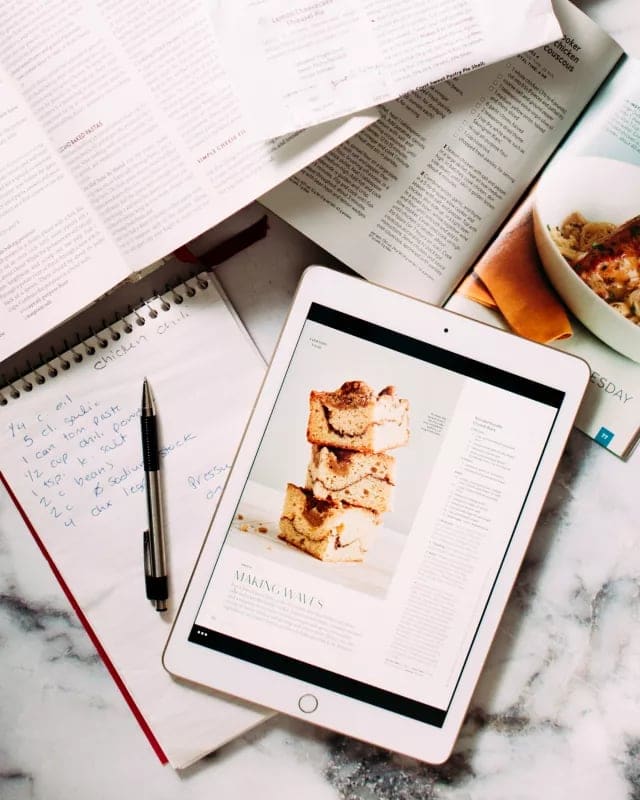
How To Organize Recipes
How to organize recipes: Do you have a bookshelf to the ceiling packed with cookbooks, years’ worth of subscriptions to a half-dozen food magazines, a roster of 25 food blogs you follow obsessively, and a binder full of grandma’s recipes? I’ve got you!
At a Glance: How To Organize Recipes
I’m gonna jump right to the point. It’s TOTALLY free and probably already on your phone! It’s the Reminders App for Apple users (or Google Keep for Android users).
I use Reminders to organize my entire life, but the recipe part is the most valuable to me.
Do you have a bookshelf to the ceiling packed with cookbooks, years worth of subscriptions to a half-dozen food magazines, a roster of 25 food blogs you follow obsessively and a binder full of grandma’s recipes?
If you actually want to use all these sources, the search is chaotic. Yes, Pinterest boards are great for websites, but what about the other sources? Post-it flags in cookbooks and magazines go missing, precious hand-written cards get lost or covered in sauce, and e-magazines don’t have an option to save or download single recipes for later use.
Wouldn’t you love to have all the recipes you want to make this week (or ever) in one, searchable location, accessible from your computer, tablet or phone? I realized I sound like a scary-smile infomercialbot, but guys, I am seriously excited to share this with you. BECAUSE I HACKED A SYSTEM. And it is so awesome.
Ok, here is what you do.
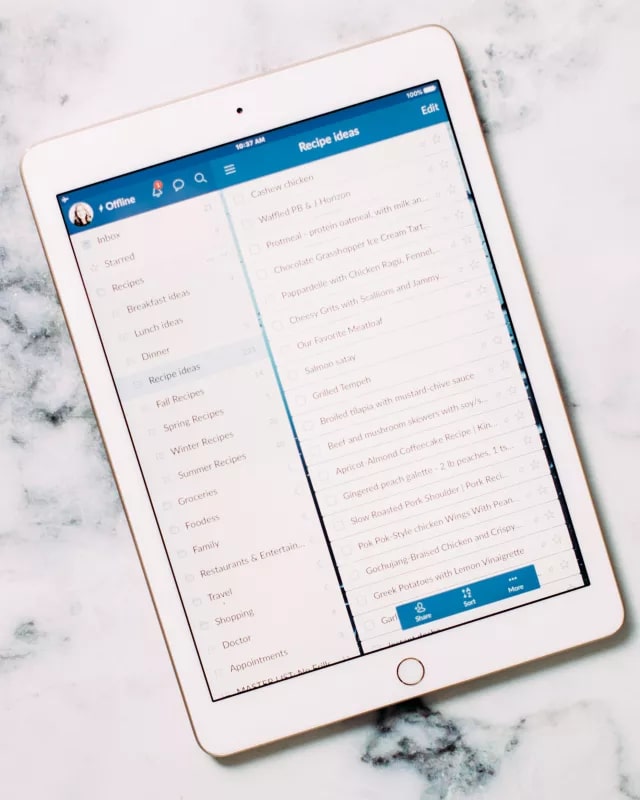
Step-by-Step Game Plan to Recipe Organization
This is exactly how I store my own recipes plus the others I’ve collected over time.
I’m going to walk you through using the Reminders app on my Apple products, but Google Keep works almost exactly the same.
- Open the Reminders app (iPhone) or Google Keep (Android): This cloud-based task management app has become my go-to tool for organizing everything, especially recipes. I’ve been hooked for years!
- Create your recipe list: Start by making a “Recipes” list. This is where the fun begins!
- How to Organize Recipes from Physical Sources (cookbooks, magazines, recipe cards, etc.):
- Grab your smartphone and open your “Recipes” list.
- Enter the recipe name in the “+ New Reminder” field and save it.
- Tap the “camera” 📷 icon at the bottom and choose “take photo” or “scan document”. Snap a pic of the recipe (whether cookbook, hand-written card, etc.)
Voila! You can now access Grandma’s secret sauce recipe anytime, anywhere!
- How to Organize Recipes From the Internet:
- Type the recipe name in the “+ New Reminder” field and paste the URL in the “notes” field. It’ll be clickable for later reference. You can also add a screenshot of the photo if you’d like a reference pic to remember what it looked like. Your own little Pinterest!
- How to Organize Recipes From Digital Magazines or Apps:
- While browsing digital magazines (I love using Apple News+), take a screenshot of the recipe page.
- In Reminders, add the recipe name and attach the screenshot from your photo library. You’re good to go!
Organizing by Recipe Type
You can either add different recipe categories as their own lists, or have one master Recipes list in the app and create subcategories.
Here’s how to create subcategories:
- Tap the “…” menu icon in the upper right corner
- Tap Manage Sections
- Tap New Section. Name it as you like (i.e. I’ve broken my Breakfast list into Pancakes + Waffles sections here)


Searching Made Easy
When you want to find a recipe, use the search bar. Type “Instant Pot,” and all your recipes with “Instant Pot” in the name will pop up.
You can even use hashtags in the notes (like “#baking” “#grill, #seafood”, “#cakes, #pork, #pies, #cookies, #candy)”.
The hashtag #️⃣ button is by the Camera icon in the menu above your keyboard, making it super easy to organize by different categories.
Your hashtags will show up below your lists when you open the app, making it easy to tap on what you’re looking for.

Within my “Recipes” folder, categories (spring, summer, fall, winter). You can organize it however you like, and it’s easy to search your collection.
Once I try a recipe, I often add notes to remind myself of what worked and what didn’t.
How to Organize Recipes the Old Fashioned Way
Honestly, this way is great, too. If you prefer sitting at a table, sifting through hardcopy, here’s a solution and method for you:
- Gather your recipes:
- Collect all your physical recipes from various sources, such as cookbooks off the shelf, magazines, handwritten cards, and printouts from the internet.
- Sort and categorize:
- Decide how you want to categorize your recipes. Common categories include appetizers, salads, soups, main dishes, desserts, vegetarian, seasonal, and more. You can even create sub-categories at this point, like chicken mains, pasta mains, slow cooker desserts, side dishes for beef, etc.
- Take some time to go through your collection and group similar recipes together.
- Use a recipe binder:
- Purchase a sturdy binder to house your recipes. A three-ring binder allows for easy addition and removal of pages.
- Page protectors:
- Protect your recipes: Use clear sheet protectors (plastic sleeves) to protect your recipes from spills and stains. This is especially useful for frequently used recipes or ingredients that might splatter (like sauces).
- Display recipes easily: When cooking, simply place the recipe you’re using in a sheet protector so you can easily flip through it without worrying about ruining the paper.
- Tab dividers:
- Create sections: Use tab dividers to separate your binder into different categories (e.g., appetizers, main dishes, desserts). Label each tab clearly for quick access.
- Seasonal or themed sections: Consider having sections for specific seasons or occasions (like holidays or BBQs) to make it easy to find recipes relevant to the time of year.
- Add a recipe index:
- Create an index at the front of your binder listing all the recipes by category. This will save you time when you’re looking for something specific. You can even number the recipes and cross-reference them with the tab dividers.
- Use pocket folders:
- For loose recipes, clippings, or handwritten recipe cards, scanned recipes, use pocket folders within the binder. This way, you can keep them organized without risking damage.
- Regularly review and purge:
- Every few months, go through your recipes and remove any that you no longer want to keep. This will help you maintain a manageable collection and make room for new recipes.
- Create a favorites section:
- Dedicate a section for your all-time favorite recipes or ones you often make. This way, you can easily find them when you need a quick go-to dish.
- Keep a backup:
- If you have especially precious recipes, consider making a digital copy by scanning or photographing them. This way, you have a backup if anything happens to the originals.
How to Organize Recipes FAQs
Just skimming through? Check out these common queries:
Can I include digital recipes in my physical recipe binder?
Absolutely! You can print out digital recipes and add them to your binder using sheet protectors. If you have recipes saved online, print them or take screenshots and then include them in your binder.
What should I do with recipes I want to try but haven’t made yet?
Create a dedicated section in your binder for “To Try” recipes. You can keep these recipes in sheet protectors or pocket folders until you’re ready to make them. Once you’ve tried a recipe, decide whether to keep it in your regular collection or remove it.
How does organizing your recipes help?
By organizing your recipes, you can save time looking for what you need to create shopping lists and get meal planning done (here’s how to do easy meal planning in 3 painless steps + How to Meal Plan without Spending a Dollar).










Loved the idea of putting all my recipes onto the reminder page BUT……if by accident I click the bubble on the right, the recipe is lost along with the photos… so scared of accidentally touching that pesky button.
I too use wunderlist for recipes. But, what are you going to do now that it’s going away? Google bought it and is doing away with it. I’m curious what you will use next?
Hi Jennifer, I LOVE this article! So much so I thought I’d solved all my recipe book problems… until I went to update wunderliat and it says they are getting rid of it on 6th May 2020 and its being replaced by Microsoft’s ‘To do’ … which is great, except it doesn’t let you add photos or tags or arrange it nearly as well!!! ?
Do you have any suggestions?
I tried using the Cook book app which looks good but is very time consuming to use if you have a lot of recipes!
The only other idea I can think of is to take photos and arrange them under different headings on my iPhone? Eg breakfast, tea etc – although I don’t think that would be searchable?
I was SO close to organising my recipes after years then! ??? x
im new to this so i like cheesecake,mermaid cakes,,giant cakes,cupcakes.
I’m sad to have jus found this, as wunderlist is going away do you know if microsoft to do will be the same as wunderlist? I am tired of having a huge folder of recipe links with no organization. lol
Regarding compiling recipes on Wunderlist: Can you share this list with other people? As my twins get closer to college age, I’ve been thinking about giving them a compilation of family-favorite recipes (some handed down on index cards, some online and others from cookbooks. I know how to go about giving them a hard version, but I think an electronic “cookbook” will be more useful to them.
I am looking for some sort of application that I can copy my mother’s recipes, make some sort of a booklet, so my other sisters may also have a copy. I have a laptop and computer to use. Any suggestions are welcome.
I added another feature – copy/paste text of recipes I had been keeping in the notes app. I input the title and then paste the whole recipe into the notes area.